


Virtual meetings are now a normal part of work. Teams use Google Meet, Microsoft Teams, Zoom, and similar platforms for interviews, strategy sessions, board meetings, training, and day-to-day discussions.
Holding the call is the easy part. The real challenge is making sure the right people attend, the discussion stays useful, and important details are not forgotten afterward. Organizations that already rely on legal transcription services for formal recordings often need the same accuracy and careful handling for important business meetings.
In this article, you will learn:
- How to decide whether a meeting is actually needed
- What to prepare before the call begins
- How to keep participants involved without wasting time
- Why recordings and transcripts are useful after the meeting
- When AI transcription is enough and when human review is the safer choice
Is the Meeting Actually Necessary?
Before sending an invitation, ask whether the topic needs a live discussion.
Not every update needs a meeting. A short announcement, routine status report, or simple question can often be handled through email or a messaging platform.
A meeting makes more sense when people need to:
- Make a decision together
- Solve a problem
- Discuss different opinions
- Brainstorm ideas
- Review sensitive or complex information
- Ask questions and receive immediate answers
Cutting unnecessary meetings gives employees more time to complete focused work. It can also make the meetings that remain feel more important.
When meetings are scheduled for a clear reason, people are more likely to prepare and participate.
Prepare Before the Meeting
A productive virtual meeting starts before anyone joins the call.
The host should know what the meeting needs to accomplish. Instead of using a broad goal such as “discuss marketing,” use something more specific, such as “choose the final campaign concept and assign the launch tasks.”
That makes it easier to build the agenda and decide who actually needs to attend.
Research from Microsoft found that agendas, pre-meeting communication, post-meeting summaries, reliable audio and video, and meeting size were all connected to how effective and inclusive employees felt meetings were.
Virtual Meeting Preparation Checklist
| Preparation item | What to do |
| Purpose | Write down the decision, answer, or result the meeting should produce |
| Agenda | Send it at least 24 hours before the meeting when possible |
| Invitation list | Include people who need to decide, advise, or complete follow-up work |
| Roles | Choose a facilitator, timekeeper, and note-taker when needed |
| Technology | Test the meeting link, microphone, camera, screen sharing, and recording settings |
| Materials | Share presentations, reports, or documents before the call |
A little preparation prevents the first ten minutes from being spent looking for files or solving audio problems.
Invite the Right People
A larger invitation list does not always lead to a better meeting.
Every required attendee should have a reason to be there. They may be making a decision, providing expertise, presenting information, or taking responsibility for the next step.
People who only need the final information can be marked as optional. They can receive the meeting notes, recording, or transcript later.
This approach respects everyone’s time. It also makes the conversation easier to manage because fewer people are competing to speak.
Time zones also matter. When a team is spread across different regions, avoid making the same employees attend outside their normal working hours every time. Rotating meeting times may be fairer for recurring calls.
Set Simple Ground Rules
Virtual meetings can quickly become difficult when several people speak at once, microphones pick up background noise, or participants do not know when to contribute.
The rules do not need to be complicated. A few basic expectations are usually enough:
- Mute microphones when background noise becomes distracting
- Use the raise-hand feature or chat when several people want to speak
- Avoid side conversations
- Keep comments related to the agenda
- Tell the group before recording the meeting
- Allow people to turn off video when bandwidth, privacy, or accessibility is a concern
Cameras can make a meeting feel more personal, although they should not automatically be required for every call. Some employees may have poor internet connections, shared workspaces, health concerns, or other reasons for keeping video off.
Good audio matters more than seeing every face.
Give Everyone a Chance to Speak
A virtual meeting can easily become a conversation between the same two or three people.
Quieter participants may have useful ideas yet find it harder to enter a fast-moving online discussion. The host should leave space for them instead of assuming silence means they have nothing to add.
A few simple methods can help:
- Ask each person for a brief update
- Use the chat for questions and comments
- Give people a moment to think before asking for answers
- Use breakout rooms for smaller discussions
- Invite input from someone who has not spoken
- Allow written follow-up after the call
Icebreakers may help when participants do not know one another, although they should be brief. Five minutes is usually enough.
The goal is to help people feel comfortable, not to delay the actual meeting.
Keep the Discussion on Track
Starting on time sends a clear message that the meeting matters.
The facilitator should move through the agenda while still allowing useful discussion. When a new issue comes up, decide whether it needs to be answered immediately or saved for later.
A “parking lot” can help. Write down important off-topic points and assign them to another meeting, email, or follow-up task.
The host may also need to step in when one person dominates the conversation. This can be handled politely by thanking the speaker and inviting someone else to respond.
For larger meetings, the stack method can work well. Participants use the raise-hand feature, and the facilitator calls on them in order.
Before moving to the next topic, confirm what was decided. Otherwise, the meeting may end with several people holding different ideas about what happened.
Follow Up While the Discussion Is Still Fresh
A meeting is not complete when everyone leaves the call.
Participants should receive a short follow-up that includes:
- Decisions made
- Action items
- The person responsible for each task
- Deadlines
- Unresolved questions
- The date of the next meeting, when applicable
Send the notes within 24 hours when possible. Waiting several days increases the chance that details will be forgotten or disputed.
The recording should also be stored somewhere authorized employees can find it. Use a consistent file name, date, meeting title, and access policy.
Government agencies and public organizations may also use government transcription services when meetings, hearings, or recorded discussions require controlled handling and consistent formatting.
Why Virtual Meetings Should Be Transcribed
Recordings are useful, yet they are slow to review.
A person looking for one decision may have to replay an hour-long meeting. A transcript turns the same conversation into searchable text.
Employees can search for a name, date, assignment, product, or decision in seconds. They can also highlight important sections and compare statements from different meetings.
Transcripts are useful for:
- Board and investor meetings
- Strategy and planning calls
- Employee interviews
- Training sessions
- Research discussions
- Product development meetings
- Compliance reviews
- Recorded presentations
Academic transcription services may also help colleges, universities, and research teams preserve virtual interviews, lectures, focus groups, and faculty meetings.
A transcript can also improve access to recorded information. W3C guidance explains that transcripts support people who are Deaf, hard of hearing, Deaf-blind, or who have difficulty processing audio. They can also help anyone who would rather read the information than replay the meeting.
Timestamps make transcripts even more useful because readers can return to the matching section of the recording.
Is AI Transcription Good Enough for Virtual Meetings?
AI transcription is fast and convenient. Most major meeting platforms now offer some form of automatic captioning, transcript generation, or meeting summary.
These features can be useful for personal notes or casual internal calls. They should not automatically be treated as the final record of an important meeting.
Depending on the system, recording quality, speakers, and testing method, AI transcription may be only 61.92% accurate.
Automatic speech recognition can struggle with:
- Several people speaking at once
- Industry terminology
- Names and company terms
- Accents and dialects
- Poor microphones
- Weak internet connections
- Background noise
- Numbers and financial figures
- Speaker identification
- Informal or incomplete sentences
One wrong word may seem minor until it changes a deadline, dollar amount, product name, or assigned responsibility.
W3C guidance on remote meetings also notes that automatic speech recognition may not provide sufficiently reliable results without human correction, especially when accurate communication matters.
AI still has a place. It can produce a quick first draft and reduce the time needed to begin reviewing the recording.
The problem comes from using that unchecked draft as the finished document.
When every word matters, professional verbatim transcription services can preserve interruptions, false starts, repeated words, speaker changes, and other details that automatic tools may remove or misread.
AI Drafts Still Need Human Review
A human transcriptionist does more than correct spelling.
The transcriptionist listens to the recording, follows the discussion, checks the surrounding context, identifies speakers, researches unfamiliar terminology, and reviews unclear sections more than once.
For example, AI may hear “market share” as “market chair.” A human reviewing a sales meeting can recognize which version makes sense.
The same applies to names, financial figures, project codes, product terms, and technical language.
Human review is especially important for meetings involving:
- Investors or financial results
- Employment decisions
- Confidential business plans
- Legal matters
- Medical information
- Government work
- Regulatory or compliance issues
For these meetings, the final transcript should be accurate enough to rely on later.
Why Clients Choose Ditto for Virtual Meeting Transcription
Important meetings may contain business plans, financial information, personnel discussions, research, legal strategy, or other confidential details.
At Ditto Transcripts, recordings are handled by trained human transcriptionists instead of being returned as unchecked AI output.
Here is what Ditto offers:
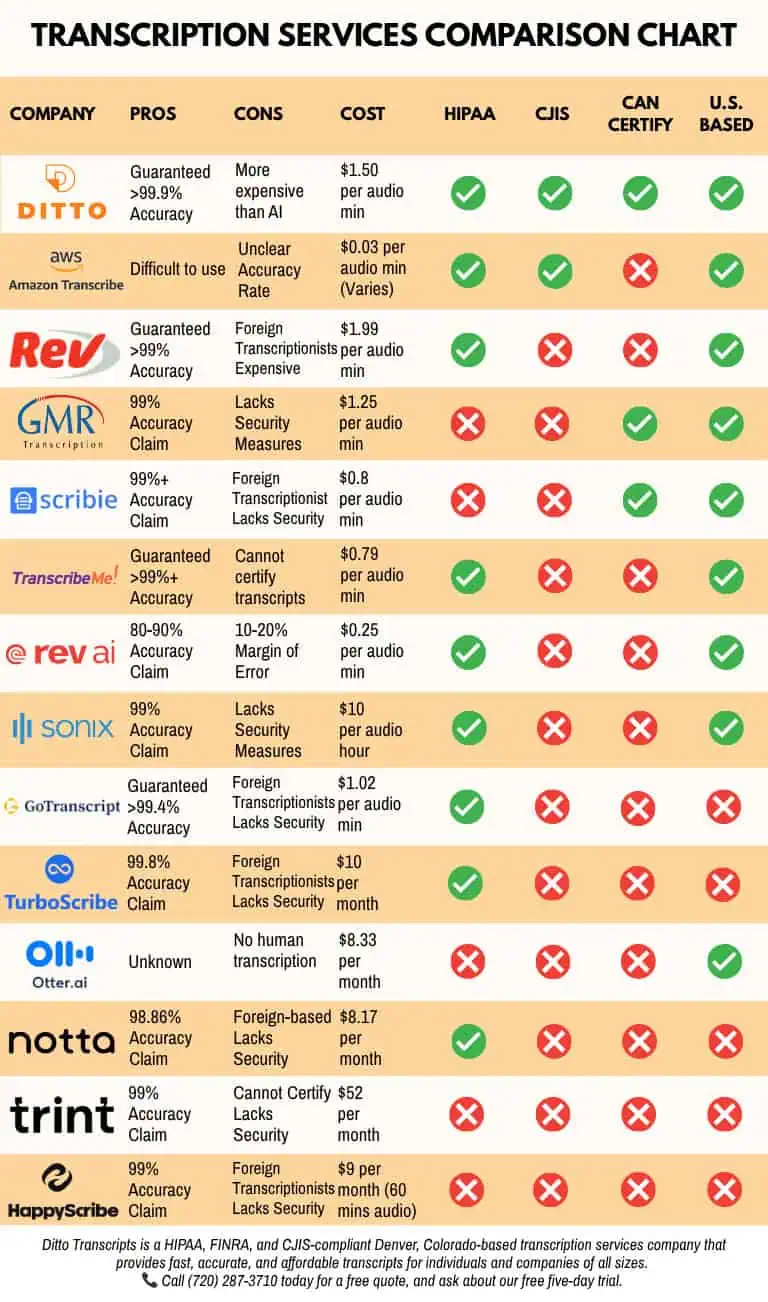
- Human-reviewed accuracy: Ditto guarantees 99% accuracy for completed human transcription projects.
- Business meeting experience: Our transcriptionists work with board meetings, investor calls, conference calls, presentations, focus groups, interviews, and internal discussions.
- U.S.-based transcriptionists: Projects are completed by professionals familiar with American English, business terminology, and common meeting formats.
- Secure handling: Ditto provides HIPAA-, CJIS-, and FINRA-compliant transcription support for organizations handling sensitive recordings.
- Speaker labels and timestamps: Clients may request formatting that makes it easier to identify participants and return to specific parts of the recording.
- Custom transcript options: Ditto can provide polished transcripts, verbatim transcripts, timestamps, and client-specific formatting.
- Flexible turnaround: Rush, standard, and extended options are available depending on the length and difficulty of the recording.
- Clear legal transcription pricing: General transcription rates currently start at $1.50 per audio minute for extended turnaround. Pricing may increase for difficult audio, several speakers, or faster delivery. Ditto also has a $100 project minimum.
- No long-term commitment: Clients may submit one meeting or use Ditto for recurring projects without signing a long-term contract.
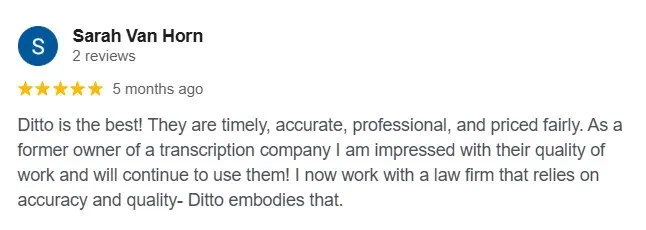
- Client feedback: Read Ditto’s testimonials to learn how clients describe the company’s accuracy, communication, turnaround times, and service.
Better Meetings Need Better Follow-Through
An effective virtual meeting has a clear purpose, the right attendees, a useful agenda, and a defined result.
It should also leave behind a record people can use.
Recordings preserve what happened. However, transcripts make that information easier to search, review, share, and act on. AI can produce a quick draft, although important meetings still benefit from trained human review.
Ditto Transcripts helps businesses turn virtual meeting recordings into accurate, searchable documents without relying on unchecked AI output.
Ditto Transcripts is a Denver, Colorado-based transcription services company that provides fast, accurate, and affordable transcripts for individuals and organizations of all sizes. Ditto is HIPAA-, CJIS-, and FINRA-compliant. Call (720) 287-3710 today for a free quote.