


Missing a call can disrupt an entire workday. Professionals may spend valuable time replaying long messages, searching for names or numbers, and capturing details from unclear audio. Voicemail transcription solves this problem by converting a recorded message into searchable text, allowing users to review information without repeatedly replaying the audio.
In this article, you will learn:
- Which phones and platforms provide built-in voicemail transcription
- How to create a more accurate transcript manually
- Where automated transcription commonly fails
- When professional human transcription is the better option
What Is Voicemail Transcription?
Voicemail transcription converts a spoken message into written text. The result may appear in a phone app, arrive by email, or be delivered as a formatted document.
A transcript makes it easier to find a name, copy an address, confirm a deadline, or share approved information with a colleague. The recording remains the source, while the transcript provides a convenient reference.
A clean-read transcript removes unnecessary filler and repetition while preserving meaning. Verbatim transcription may be more appropriate when every spoken word, hesitation, or false start must be retained.
Voicemail Transcription Features on Common Platforms
Built-in features are convenient, although availability depends on the device, software version, carrier, country, and language.
| Device or platform | What to expect |
| iPhone | Visual Voicemail can display saved-message transcripts, while Live Voicemail can show a real-time transcription. Availability varies by carrier, region, and language. |
| Android with Phone by Google | Visual voicemail and transcripts are available only on supported devices and carriers. Google currently lists English and Spanish support on Android 8.0 and later. |
| Google Pixel | Supported Pixel devices may offer Take a Message, which can record and transcribe missed or declined calls on the device in supported regions. |
| Samsung Galaxy | Live Caption can caption voicemail audio during playback. Newer Galaxy models may also offer Direct Voicemail and Transcript Assist, depending on the device and software. |
| Google Voice | Users can read and search voicemail transcripts or receive them by email. Google warns that transcripts may be incorrect or missing. |
A feature listed for one phone may not appear on another using the same operating system. Carrier-provided voicemail apps can also behave differently from the manufacturer’s app.
How to Transcribe a Voicemail on Your Phone
Start by checking whether your phone already provides a transcript.
- Open voicemail. On an iPhone, open the Phone app and select Voicemail. On supported Android devices, open the Phone app and look for Visual Voicemail.
- Select the message. If transcription is supported, the text may appear automatically.
- Check the recording. Confirm names, dates, phone numbers, prices, and instructions against the audio.
- Save or share it carefully. Avoid forwarding sensitive information through an unsecured channel.
- Use another method if needed. Type the message manually, use an approved tool, or send the recording to a professional provider.
How to Transcribe Voicemails Manually
Manual transcription can work for a short, clear message. Use headphones, reduce background noise, and work from a saved copy when possible.
A multi-pass process is usually more reliable:
- First pass: Capture the main point and general wording.
- Second pass: Verify names, numbers, dates, addresses, and unclear phrases.
- Final pass: Correct punctuation and formatting without changing the meaning.
Slow difficult sections if your audio player allows it. Mark words as unclear rather than guessing. Manual work becomes less practical when messages are long, frequent, technical, or poorly recorded. A professional provider may also be appropriate for agencies that use government transcription services or organizations that handle confidential information.
The Weaknesses of Automated Voicemail Transcription
Automated transcription is fast. However, background noise, weak connections, accents, unfamiliar names, technical language, and compressed audio can reduce accuracy.
When an automated transcript is only 61.92% accurate, the user must still correct a substantial part of the message. A single error can change a phone number, deadline, dollar amount, medication name, or instruction.
AI may confuse similar-sounding words, omit a negative such as “not,” or assign the wrong meaning to an unclear phrase. These errors become more serious when a voicemail relates to a dispute, a patient matter, a financial decision, or a formal record.
For sensitive healthcare or insurance projects, organizations may need the controls and specialized expertise associated with medicolegal transcription services rather than an AI-generated transcript.
When Professional Voicemail Transcription Makes Sense
Built-in tools are often sufficient for short, clear, low-risk messages. Professional transcription is more useful when the wording must be preserved, audio quality is poor, several messages need consistent formatting, or the voicemail contains legal, medical, financial, or regulated information.
Before sending a recording to any provider, confirm who can access it, how it is transferred, where it is processed, and when it will be deleted.
Why Clients Choose Ditto for Voicemail Transcription
Voicemail transcription is not only about turning speech into text. It is about producing a record that is accurate, readable, secure, and useful. At Ditto Transcripts, trained human transcriptionists handle recordings that automated tools may struggle to interpret.
Clients choose us becuase of what we offer:
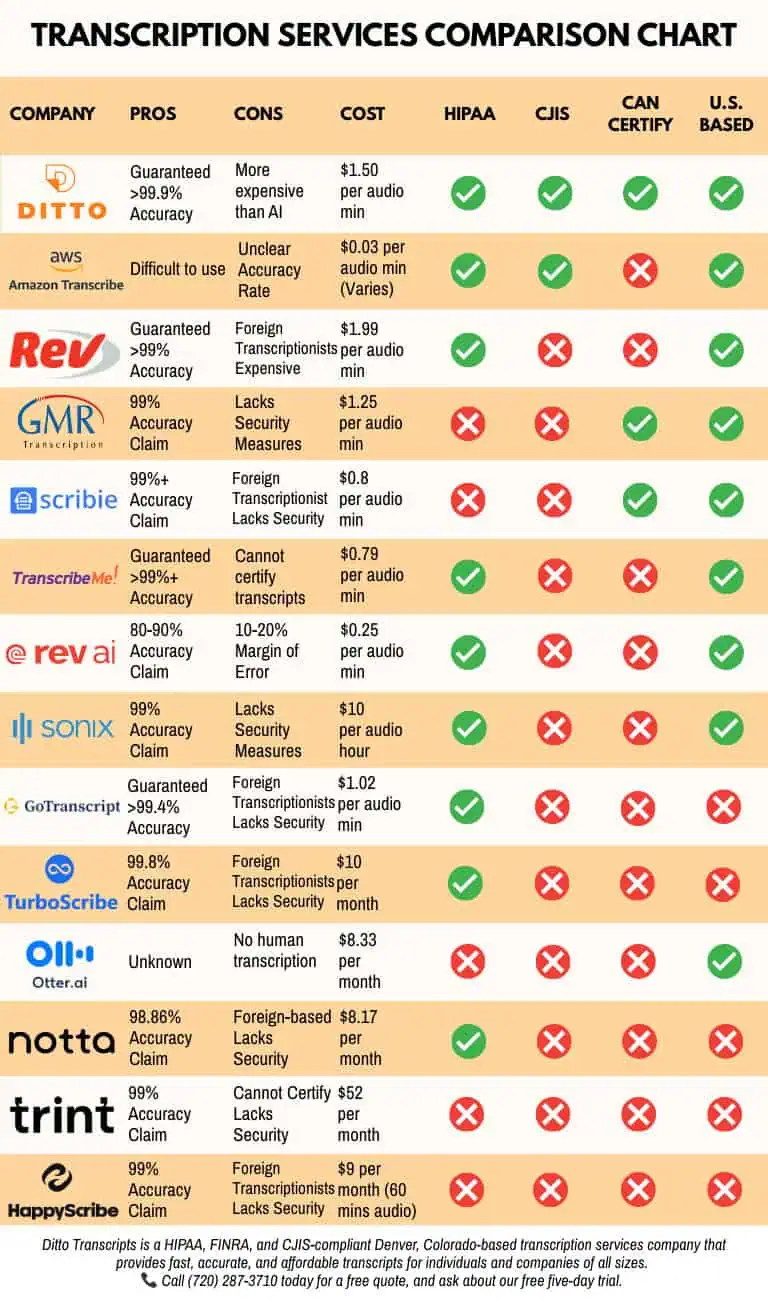
- Human-reviewed accuracy: Ditto provides a 99% accuracy guarantee for completed human transcription projects using U.S.-based transcriptionists.
- Support for difficult audio: Transcriptionists can review low-volume speech, accents, technical terminology, and unclear sections multiple times.
- Flexible formats: Clients can request clean-read or verbatim output, timestamps, speaker labels, and custom formatting.
- Secure handling: Ditto supports HIPAA-, CJIS-, and FINRA-compliant transcription workflows for sensitive information.
- Clear pricing and turnaround: Standard, extended, and rush options are available. Published legal transcription prices range from $1.50 to $5.00 per audio minute, depending on factors such as turnaround, audio quality, and speaker count.
- No long-term contract: Clients can submit one recording or use Ditto for recurring telephone-recording projects.
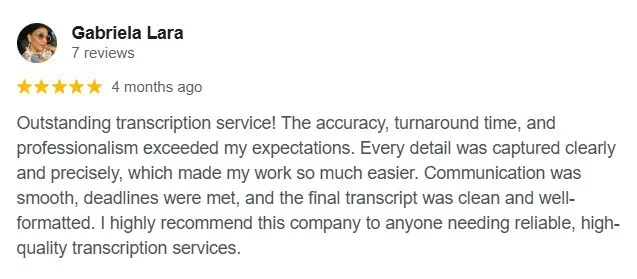
- Client feedback: Ditto’s testimonials discuss its accuracy, response times, pricing, formatting, and service.
Turn Important Voicemails Into Useful Records
Built-in phone tools can make everyday voicemail easier to review, although their features and accuracy vary. Manual transcription offers more control over short messages, although it can be time-consuming when recordings are lengthy or unclear.
When a voicemail contains important instructions, sensitive information, or wording that must be preserved, professional human transcription provides stronger review and quality control.
Ditto Transcripts helps businesses, professionals, agencies, and individuals convert voicemail and telephone recordings into accurate, searchable documents. Contact the team for a free quote or ask about the available free trial.
Ditto Transcripts is a Denver, Colorado-based transcription company that is FINRA-, HIPAA-, and CJIS-compliant, providing fast, accurate, and affordable transcripts for organizations and individuals. Call (720) 287-3710 for more information.