


Video remains one of the most popular ways for brands to reach online audiences. According to Wyzowl’s 2026 survey, 84% of consumers want to see more online videos from brands.
Producing a strong video is only part of the work. The same attention to detail expected from legal transcription services also matters when spoken content is converted into text. Accurate transcripts and captions can make videos easier to understand, search, reuse, and access.
Although captions and transcripts are closely related, they serve different purposes.
In this article, you’ll learn:
- The key differences between video transcripts and captions
- How transcripts and captions improve accessibility and viewer comprehension
- How written video content supports search, navigation, SEO, and repurposing
- When to use in-house, automatic, or professional human transcription
- What to look for in a reliable video transcription and captioning service
What Is the Difference Between Captions and Transcripts?
Transcription is the process of converting spoken audio into written text. A video transcript is usually presented as a separate document or displayed beside or below the video.
Captions also convert speech into text, although they appear on the screen and are synchronized with the audio. They may include speaker labels and descriptions of important sounds, such as [applause], [music], or [door closes].
YouTube, for example, allows viewers to open a transcript for videos with captions, read along, search for a specific section, and select a line to jump to that part of the video.
| Feature | Video transcript | Captions |
| Placement | Separate from or displayed beside the video | Shown directly on the video |
| Timing | May include timestamps, though it is not always synchronized | Synchronized with the audio |
| Main use | Reading, searching, quoting, and repurposing | Following the video while it plays |
| Sound descriptions | Optional | Often included when relevant |
| Format | Document, webpage text, or transcript panel | Closed or open caption track |
Closed captions can be turned on or off. Open captions are permanently added to the video and cannot be disabled.
Why Video Transcripts and Captions Matter
Transcripts and captions offer overlapping benefits, yet neither is a complete substitute for the other. Using both gives viewers more ways to access and understand the content.
They Make Videos More Accessible
Captions help people who are deaf or hard of hearing understand the spoken and meaningful audio content in a video. They may also help viewers watching without sound, people learning a language, and anyone who has difficulty understanding a speaker or accent.
WCAG 2.1 requires synchronized captions for prerecorded audio in video content at Level A. The W3C explains that these captions allow people who are deaf or hard of hearing to understand the audio.
Transcripts provide another format for accessing the same information. A viewer can read the full content without playing the video or repeatedly moving through the timeline.
This is especially useful for lectures, interviews, training videos, webinars, and research recordings. Organizations working with educational material may also use academic transcription services to prepare searchable versions of classes, presentations, and interviews.
They Help Viewers Follow the Content
Not everyone watches videos in ideal conditions. A viewer may be in a noisy room, using a device with poor speakers, or watching in a place where the sound must remain off.
Captions let that person follow the video without relying entirely on audio. They also help clarify:
- Unfamiliar names
- Technical language
- Fast speech
- Strong accents
- Quiet dialogue
- Multiple speakers
A correct caption can prevent viewers from missing an important point. However, inaccurate captions may create more confusion than having no captions at all.
They Support Search and Navigation
Transcripts make it easier to locate a particular name, phrase, question, or topic.
Instead of replaying an entire interview or webinar, a user can search the text and move directly to the relevant section. On YouTube, viewers can select a line in an available transcript to jump to the corresponding moment in the video.
This feature is helpful for:
- Long interviews
- Online courses
- Product demonstrations
- Public meetings
- Podcasts published with video
- Training and instructional content
A well-organized transcript can also include headings, speaker labels, and timestamps to make navigation easier.
They Create More Content From One Recording
Transcripts make it possible to reuse information that has already been recorded.
A business can turn a webinar, interview, presentation, or podcast into:
- A blog article
- Social media posts
- An email series
- A downloadable guide
- Training notes
- Frequently asked questions
- Short clips with captions
- Quotes for promotional materials
This does not mean publishing an unedited transcript as a finished article. Spoken language often contains repetition, incomplete thoughts, and filler words. The transcript provides a reliable starting point that can be edited for a new format.
For interviews or recordings where the exact wording matters, verbatim transcripts can preserve repetitions, false starts, pauses, and relevant nonverbal sounds.
They Can Support SEO
Search engines need text and page context to understand what online content covers. A transcript placed on a webpage gives search engines more written information about the topics discussed in the video.
It can naturally include relevant names, questions, products, locations, and subject-specific terms. This may improve the page’s ability to appear for useful searches, although a transcript does not guarantee higher rankings.
The transcript should be treated as useful content rather than a place to repeat keywords. Clear headings, accurate text, original information, and a good user experience remain more important than keyword volume.
Captions may also improve discoverability within video platforms. YouTube marks captioned videos with a CC label and allows users to filter search results to show videos with subtitles or captions.
Captions May Also Be an Accessibility Requirement
For some organizations, captions are more than an optional viewer feature.
The Department of Justice explains that the ADA applies to services and activities offered online by state and local governments and businesses open to the public. Appropriate communication aids may include captions when they are necessary for effective communication.
State and local government websites and mobile applications are also subject to the ADA Title II web accessibility rule. The rule uses WCAG 2.1 Level AA as its technical standard, which includes captioning requirements for prerecorded and live synchronized media.
This makes accurate captioning particularly important for public meetings, announcements, hearings, training material, and public-safety videos. Agencies handling this content may use government transcription services to prepare accessible and reviewable records.
The exact legal requirements depend on the organization, content, jurisdiction, and circumstances. Businesses should obtain legal or accessibility advice when determining which rules apply.
Human Transcription or Automatic Transcription?
There are three common ways to produce transcripts and captions.
In-House Transcription
A staff member can listen to the recording, type the transcript, proofread it, and add caption timing.
This gives the organization direct control, yet it can take considerable time. The employee must also understand speaker labeling, formatting, timestamps, and caption conventions.
Building a dedicated in-house transcription team introduces additional hiring, training, equipment, and management costs. It may make sense for organizations with consistent volume, although not for occasional projects.
Automatic Transcription
AI and automatic speech recognition can create drafts quickly. Many video platforms also generate automatic captions.
However, AI transcription accuracy may be only 61.92%, depending on the tool, audio quality, speakers, and testing method. Automatic output may require significant editing when a recording contains:
- Background noise
- Multiple or overlapping speakers
- Technical terminology
- Names and locations
- Accents or dialects
- Low-volume speech
- Poor recording quality
- Music or sound effects
YouTube itself describes automatic captions as caption tracks created through speech-recognition technology. It also gives creators tools to edit captions and add important sound information.
AI can be useful for creating a first draft. It should not be assumed that the draft is ready to publish without review.
Professional Human Transcription
A professional transcriptionist listens to the complete recording, checks the context, identifies speakers, researches unfamiliar terms, and reviews the final text.
Human transcription generally costs more than an unchecked automated draft, although it reduces the amount of correction required from the client. It is particularly valuable for technical, legal, medical, academic, or public-facing content where mistakes could affect credibility or meaning.
Why Clients Choose Ditto for Video Transcription and Captioning
A transcript should make a video more useful, not give the content creator another document to rewrite.
At Ditto Transcripts, we help businesses, educators, agencies, content creators, and other organizations turn audio and video into accurate, readable text.
Here is what Ditto offers:
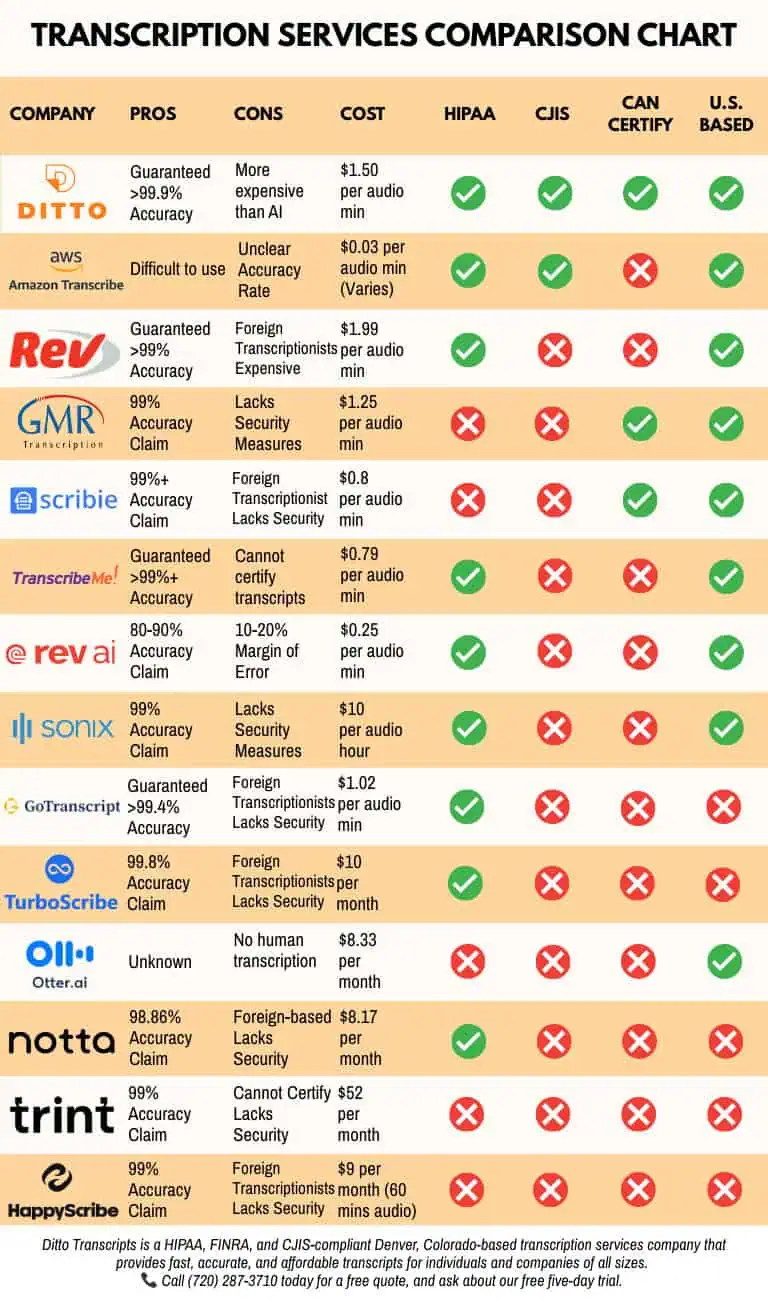
- 99% guaranteed accuracy: Completed transcripts are prepared and reviewed by trained professionals rather than delivered as unchecked AI output.
- U.S.-based human transcriptionists: Ditto uses professional transcriptionists who understand context, speaker flow, names, and technical terminology.
- Caption-ready options: Clients can request timestamps and formatting suited to captioning and video workflows.
- Flexible transcript styles: Clean and verbatim options are available depending on how the finished document will be used.
- Support for difficult recordings: Our transcriptionists can work with multiple speakers, accents, background noise, interviews, webinars, and technical material.
- Secure file handling: Ditto is HIPAA-, CJIS-, and FINRA-compliant, supporting clients with sensitive or confidential recordings.
- Flexible turnaround: Delivery options are available based on recording length, urgency, and project requirements.
- Clear legal transcription pricing: Ditto explains available add-ons and turnaround options before work begins.
- No long-term contract: Clients can submit one video or ongoing projects without committing to a minimum number of files or minutes.
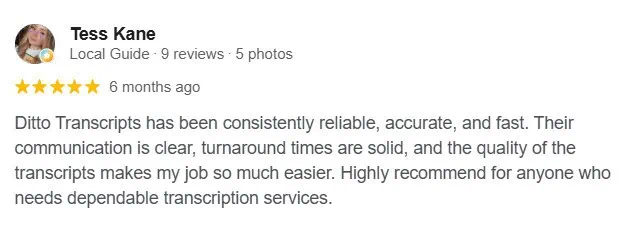
- Client feedback: Read our testimonials to learn how customers describe Ditto’s accuracy, communication, and service.
Make Every Video Easier to Use
Videos may attract attention, although transcripts and captions help more people understand and use the content.
Captions provide synchronized text while the video plays. Transcripts give viewers a separate document they can read, search, quote, and repurpose. Together, they support accessibility, navigation, content development, and online visibility.
AI can create a quick first draft. However, a trained human is still the safer choice when accuracy matters.
Ditto Transcripts is a Denver, Colorado-based transcription services company providing fast, accurate, and affordable transcripts for individuals and organizations of all sizes. Ditto is HIPAA-, CJIS-, and FINRA-compliant. Call (720) 287-3710 today for a free quote.