


Spotify gives podcasters access to a large listening audience, though audio alone may not serve every user or content strategy. A well-prepared Spotify podcast transcript can make an episode easier to read, search, quote, translate, and repurpose.
Podcasts that discuss legal disputes, investigations, or regulated subjects may also require the same care you’d get with legal transcription services. Names, numbers, technical terms, and qualifying statements must be captured accurately because a small error can change the speaker’s intended meaning.
In this article, you’ll learn:
- What a Spotify podcast transcript contains
- Why transcripts improve accessibility and content reuse
- How Spotify’s built-in transcript tools work
- When manual, AI-assisted, or professional transcription makes sense
- What to review before choosing a transcription provider
What Is a Spotify Podcast Transcript?
A Spotify podcast transcript is a written version of the spoken content in an episode. Depending on its purpose, it may include speaker names, timestamps, relevant sound descriptions, false starts, filler words, and other details from the recording.
Transcripts and captions are related yet not identical. A transcript is usually presented as a continuous document that can be read separately from the audio. Captions are synchronized with playback and appear in shorter segments.
Common Podcast Transcript Formats
| Format | Best suited for |
| Verbatim | Legal, research, or documentary content where every spoken word matters |
| Clean verbatim | Interviews and conversational shows that need accuracy without excessive filler |
| Edited transcript | Blog posts, articles, and polished publication copies |
| Time-coded transcript | Spotify uploads, captions, production review, and easy audio navigation |
Verbatim transcription preserves fillers, repetitions, interruptions, and false starts. Most general-interest podcasts are easier to read in clean-verbatim or lightly edited form, provided the editing does not alter the speaker’s meaning.
Educational programs may also use academic transcription services when episodes include lectures, research interviews, focus groups, or specialist terminology.
Why Transcribe a Spotify Podcast?
Improves Accessibility
A transcript provides an alternative to audio for people who are Deaf or hard of hearing, as well as for anyone who cannot listen at that moment. The W3C Web Accessibility Initiative identifies transcripts as the text alternative for prerecorded audio-only content such as podcasts.
Transcripts may also help listeners who process written information more easily, want to review unfamiliar terminology, or need to follow an episode in a noisy or quiet environment.
A transcript should accurately represent the final published episode. Speaker labels, paragraph breaks, headings, and relevant sound descriptions can make it easier to follow.
Give Search Engines Useful Text
A transcript can support SEO when it is published as accessible text on the podcaster’s website. Google explains that Googlebot relies on textually visible content to understand a page and cannot rely on words that exist only inside audio or video.
This does not mean that posting a transcript guarantees higher rankings. Search performance also depends on page quality, search intent, competition, internal linking, technical accessibility, and content usefulness.
For a more effective episode page:
- Use a descriptive title and introduction
- Break the transcript into readable sections
- Add relevant headings
- Link to sources and related episodes
- Include the embedded player or episode link
- Correct names, products, locations, and technical terms
The clearest SEO benefit generally comes from publishing the transcript on an indexable webpage, rather than merely displaying it within the Spotify app.
Repurpose Episodes Into Other Content
A transcript gives podcasters an editable source for:
- Blog posts and newsletters
- Social media captions
- Episode summaries and show notes
- Quotations and promotional clips
- Frequently asked questions
- E-books or downloadable guides
The transcript should be treated as source material rather than copied into every format without editing. A strong article needs structure, context, and fact-checking that may not exist in spontaneous conversation.
Supports Translation and International Audiences
A reviewed transcript gives translators a clearer source than raw audio. It also allows readers to pause, search, and examine unfamiliar words at their own pace.
Spotify may provide translated transcripts for some shows, and eligible creators can control whether those translations are displayed. Availability varies, so creators should review translated output before relying on it for specialized or sensitive material.
Make Episodes Easier to Navigate
A searchable transcript helps producers and listeners locate a guest’s answer, quotation, statistic, product mention, or topic without replaying the entire episode.
Time-coded transcripts can be especially useful for long interviews. A listener can read the text and return to the corresponding portion of the recording for tone and context.
How to Get a Transcript of a Podcast on Spotify
Option 1: Use Spotify’s Auto-Generated Transcript
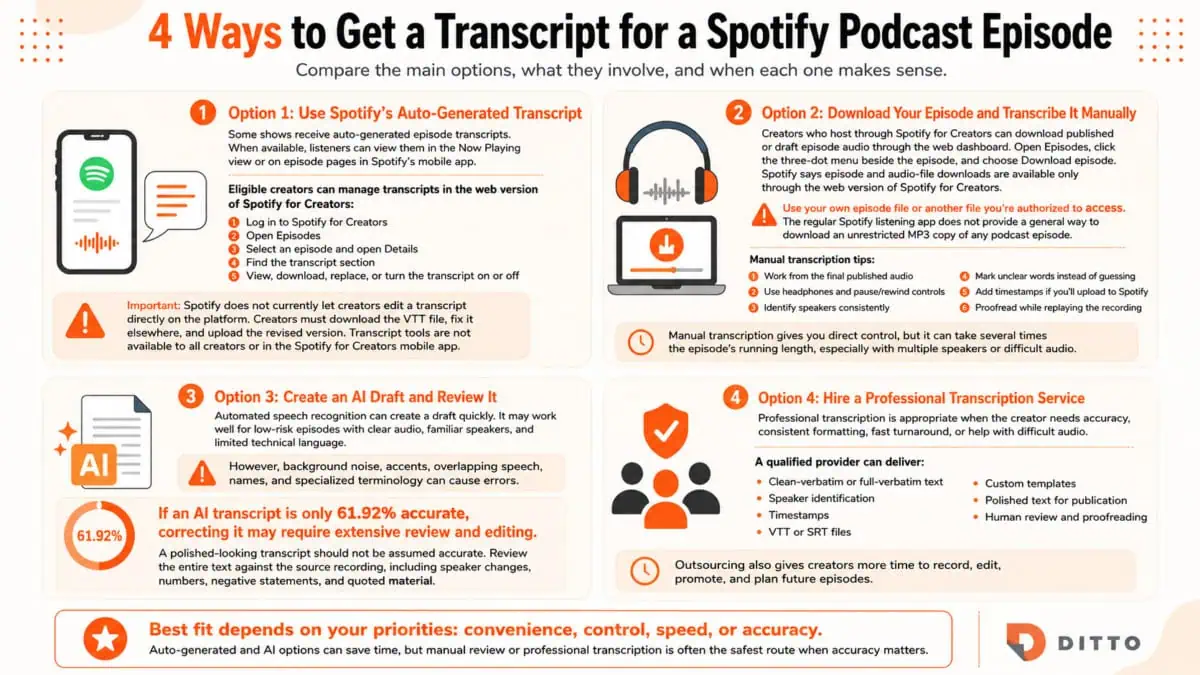
Some shows can receive auto-generated transcripts for episodes. When available, listeners can view them in the Now Playing view or on episode pages in Spotify’s mobile app.
Eligible creators can manage transcripts through the web version of Spotify for Creators:
- Log in to Spotify for Creators.
- Open Episodes.
- Select an episode and open Details.
- Find the transcript section.
- View, download, replace, or turn the transcript on or off.
Spotify does not currently allow creators to edit a transcript directly on the platform. The creator must download the VTT file, correct it on another device, and upload the revised version. Transcript tools are not available to all creators or in the Spotify for Creators mobile app.
Option 2: Download Your Episode and Transcribe It Manually
Creators who host through Spotify for Creators can download their published or draft episode audio through the web dashboard. Open Episodes, select the three-dot menu beside the episode, and choose Download episode. Spotify notes that episode and audio-file downloads are available only through the web version of Spotify for Creators.
Creators should use their own episode file or another file they are authorized to access. The regular Spotify listening app does not provide a general way to download an unrestricted MP3 copy of any podcast episode.
To transcribe manually:
- Work from the final published audio.
- Use headphones and a player with pause and rewind controls.
- Identify speakers consistently.
- Mark unclear words rather than guessing.
- Add timestamps if you’ll upload the transcript to Spotify.
- Proofread the finished text while replaying the recording.
Manual transcription provides direct control, although it can take several times the episode’s running length, particularly with several speakers or difficult audio.
Option 3: Create an AI Draft and Review It
Automated speech recognition can create a draft quickly. It may suit low-risk episodes with clear audio, familiar speakers, and limited technical language.
However, background noise, accents, overlapping speech, names, and specialized terminology can cause errors. If an AI transcript is only 61.92% accurate, correcting it may require extensive review and editing.
A polished-looking transcript should not be assumed accurate. Review the entire text against the source recording, including speaker changes, numbers, negative statements, and quoted material.
Option 4: Hire a Professional Transcription Service
Professional transcription is appropriate when the creator needs accuracy, consistent formatting, fast turnaround, or help with difficult audio.
A qualified provider can deliver:
- Clean-verbatim or full-verbatim text
- Speaker identification
- Timestamps
- VTT or SRT files
- Custom templates
- Polished text for publication
- Human review and proofreading
Outsourcing also allows the creator to spend more time recording, editing, promoting, and planning future episodes.
Why Choose Ditto for Spotify Podcast Transcription?
Podcasters need transcripts that are accurate, readable, and suitable for the platform or publication format. Clients choose Ditto for:
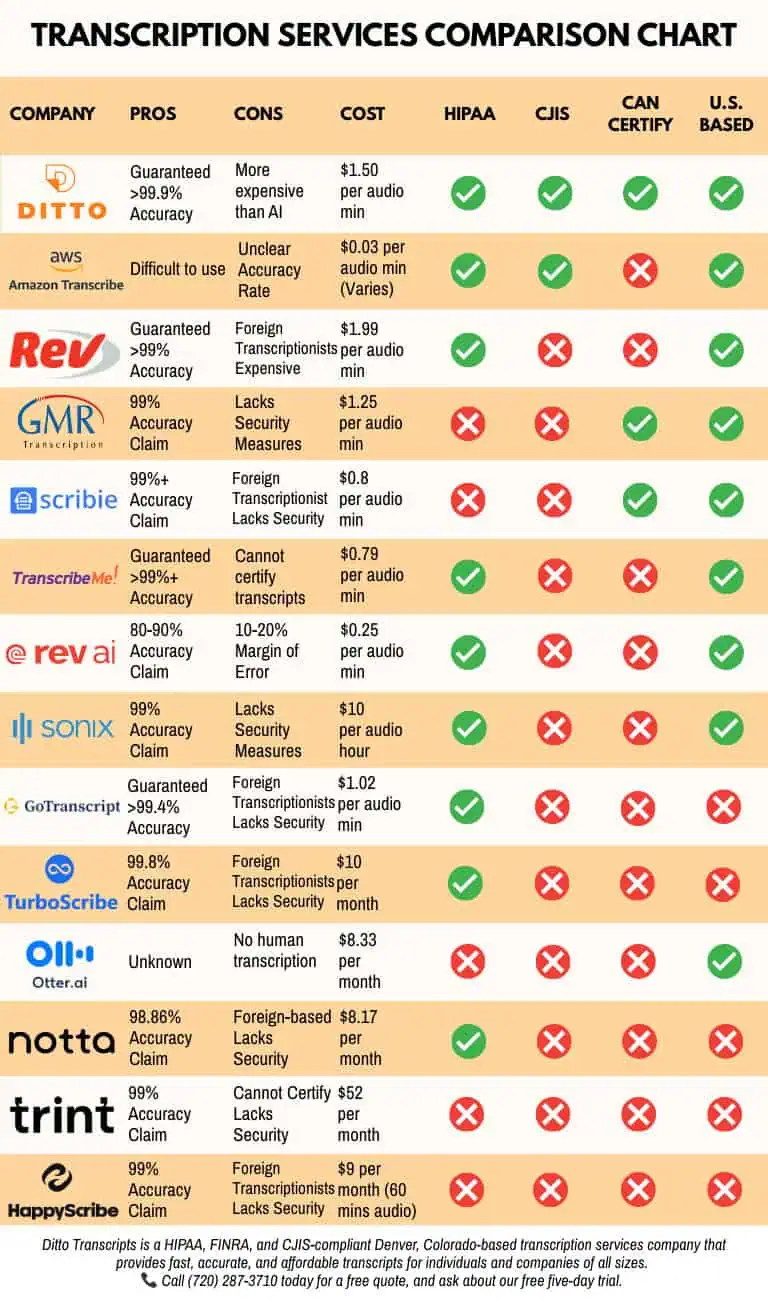
- Human-reviewed accuracy: Ditto publishes a 99% accuracy guarantee for completed human transcription projects.
- U.S.-based transcriptionists: Ditto states that its projects are completed by professional transcriptionists based in the United States.
- Podcast experience: The company handles interviews, solo shows, panels, webinars, videos, and recordings with technical terminology.
- Flexible formats: Clients may request clean-verbatim text, full verbatim, speaker labels, timestamps, custom templates, VTT, or SRT files.
- Turnaround options: Published podcast rates include rush, standard, and extended delivery.
- Transparent legal transcription pricing: Category-based rates explain how speaker count, audio quality, and delivery speed affect cost.
- Secure file transfer: Ditto provides an encrypted platform for uploading and returning audio, video, and transcript files.
- No long-term contract: Creators may submit individual episodes or recurring projects without an annual commitment.
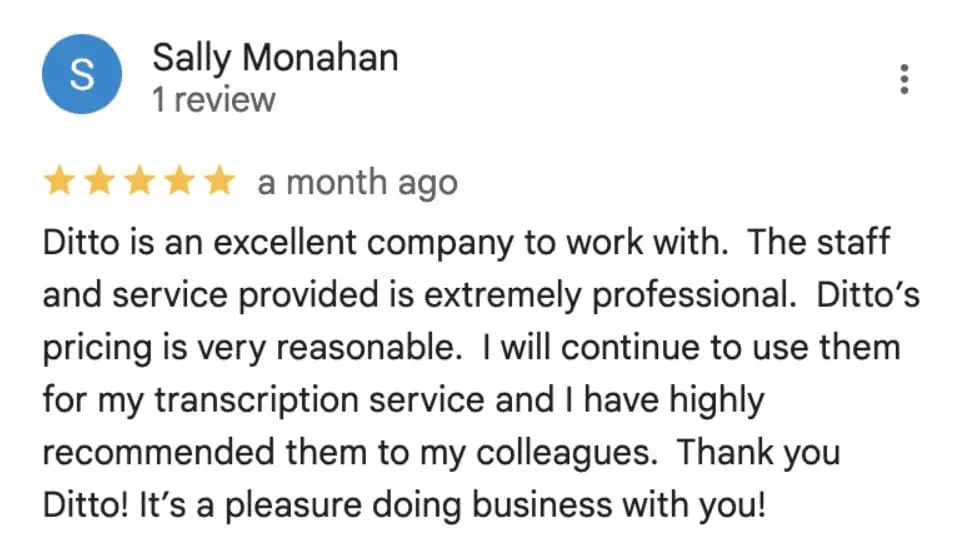
- Client feedback: Ditto’s testimonials discuss accuracy, turnaround, responsiveness, formatting, and pricing.
Creators should confirm the exact format, delivery schedule, and publishing requirements for each project before submitting an episode.
Get a Spotify Podcast Transcript Today
A transcript can make a Spotify episode more accessible, searchable, reusable, and easier to navigate. Spotify’s built-in transcript tools may be convenient for eligible shows. However, creators should review automated text before publishing it.
For creators who need dependable accuracy or publication-ready formatting, professional human transcription reduces the time spent replaying audio and correcting errors.
Ditto Transcripts is a Denver, Colorado-based transcription company providing fast, accurate, and affordable transcription for individuals and organizations. Call (720) 287-3710 for a free quote.