


Audio and video content are powerful communication materials, though they are not always accessible. If audio is unclear or visuals are blurry or distorted, viewers are likely to miss important information, whether in a podcast, webinar, training video, lecture, interview, recorded meeting, or materials prepared through legal transcription services.
A good transcript supports accessibility, improves usability, and gives more people a practical way to search, review, quote, translate, or save your content.
In this article, you’ll learn…
- How companies can use WCAG-compliant transcripts to make audio and video content more accessible for people who are deaf, hard of hearing, deaf-blind, blind, low vision, or anyone who needs a readable alternative.
- Why transcripts help organizations meet accessibility expectations while also improving usability, searchability, documentation, content review, translation, training, and long-term recordkeeping.
- How Ditto helps companies create accurate, readable, and compliance-focused transcripts that include speaker labels, meaningful sounds, clear formatting, and important visual details when needed.
What Is WCAG-Compliant Transcription?
Web Content Accessibility Guidelines (WCAG) are published by the World Wide Web Consortium (W3C) and explain how to make digital content more accessible to people with disabilities.
WCAG-compliant transcription helps bridge the accessibility gap by providing readable, searchable text derived from spoken content, important sounds, and visual details.
A good transcript is not only a rough copy of spoken words. It may also include:
- Speaker labels
- Important sounds
- Meaningful pauses or interruptions
- Visual details when needed
- Clear formatting
- Accurate terminology
The goal is simple: someone should be able to read the transcript and understand the content without needing to hear the audio or, in some cases, see the video.
That matters for accessibility, usability, documentation, legal review, training, education, SEO, content repurposing, and records created through court transcription services.
Why Transcripts Help More Than You Think
Transcripts are designed to improve access for people with disabilities, particularly those who are deaf, hard of hearing, deaf-blind, blind, or low vision. According to W3C, a basic transcript captures speech and important non-speech audio, such as laughter, applause, or sound effects. A descriptive transcript goes further by adding essential visual information, such as on-screen text, actions, scene changes, or other visuals needed to understand the content.
Though transcripts aren’t only helpful to disabled people, they’re also helpful to many other users.
This is sometimes called the curb-cut effect. Curb cuts were designed to help wheelchair users, parents with strollers, travelers with luggage, delivery workers, and many others.
Transcripts work the same way. They help the following:
- People in noisy rooms
- People who cannot turn on the sound
- Non-native speakers
- Students reviewing lectures
- Employees searching for training content
- Journalists pulling quotes
- Attorneys reviewing recordings
- Researchers analyzing interviews
- Viewers who prefer reading over listening
A transcript makes audio and video easier to access, search, skim, save, share, translate, and reuse, which is why accuracy is especially important in settings such as trial transcription services.
What Does WCAG Actually Require?
WCAG may sound overwhelming and technical, though it is actually very straightforward. If information is provided in audio or video, users need another way to access it.
The exact requirement depends on the type of media.
Audio-Only Content
Audio-only content includes podcasts, radio-style recordings, audio interviews, voice messages, recorded speeches, dictated notes, and other general clips without video.
For prerecorded audio-only content, WCAG Level A requires an alternative for time-based media that presents equivalent information. In straightforward terms, this usually means a transcript.
If the content is important enough to publish, it is usually important enough to make it readable.
Video Content
Video content usually requires multiple accessibility features because users may need access to spoken information, meaningful sounds, and visual information.
Captions and transcripts are related, although they are not the same.
Captions are synchronized with the video. They appear on screen while the video plays and include spoken words and important sounds. WCAG Level A requires captions for prerecorded audio content in synchronized media, except when the media is already a text alternative and clearly labeled as such.
Transcripts, however, are stand-alone written versions of the content. A person can read them without playing the video.
Here is a simple comparison:
| Accessibility Feature | What’s it for? |
| Captions | Plays coordinated text according to the video |
| Transcript | Provides an independent written version of “what’s been said” content from a recording |
You do not have to choose one over the other. In fact, captions and transcripts work best together. Captions help while the video is playing, while transcripts allow asynchronous access to content.
Accuracy Matters
Accuracy is arguably the most important part of WCAG-compliant transcription.
Inaccuracies, including missing words, incorrect names, wrong numbers, and unclear speaker labels, beat the purpose of equivalent access.
Errors like these usually lead to serious complications. That is evident in professional settings, where records must be precise. For example, in a medical setting, medicolegal transcription services are necessary to accurately and clearly capture information.
It is worth noting that WCAG does not necessarily set one universal commercial accuracy percentage for every transcript. That is why some settle for a “good enough” output, usually provided by unverified transcription companies and, in most cases, AI transcripts.
Automated transcription has come a long way, though it still has a long way to go, at least in the field of transcription. While it is fast, it struggles greatly with:
- Multiple speakers
- Background noise
- Accents or dialects
- Overlapping speech
- Poor audio quality
- Technical terminology
- Names, numbers, and locations
- Jargon
- Speaker identification
- Important sound cues
- Visual details that need description
AI transcription can help create a first draft. It should not be treated as the final step for compliance-focused content.
Human review is where accuracy, readability, and accessibility usually improve.
The Anatomy of a WCAG-Compliant Transcript
A compliant transcript should do more than place words on a page. It should help the reader understand what happened, who spoke, what was heard, and what visual information mattered.
A strong transcript usually includes four core elements.
| Transcript Element | Why It Matters | Example |
| Speaker identification | Helps readers know who is talking | Dr. Lee: “Let’s review the results.” |
| Spoken words | Gives access to the audio content | “The meeting will begin at 9 a.m.” |
| Non-speech sounds | Communicates meaningful audio cues | [Audience laughs] |
| Visual descriptions | Explains important visual information when needed | [Sarah points to a chart showing a 20% increase.] |
Speaker Identification
Speaker labels identify who is speaking.
Two speakers may be easy to identify, although that’s not always the case. Some recordings have multiple speakers, making it difficult to tell who is speaking. This is especially relevant in interviews, webinars, meetings, panel discussions, podcasts, legal proceedings, medical conversations, and law enforcement recordings, where deposition transcription services can help.
Speaker labels could be the following, which usually depend on the preference of the client:
- Narrator
- Alex
- Interviewer
- Dr. Miller
- Officer
- Attorney
- Witness
- Audience Member
The goal is clarity. A reader should not have to guess who is speaking.
For example:
Unclear: “I think we should review the file before Friday.”
Clear: Project Manager: “I think we should review the file before Friday.”
Speaker identification is especially important because the transcript may be used for review, documentation, decision-making, or official records.
Non-Speech Information
A transcript should include meaningful sounds when those sounds affect understanding.
Examples include:
- [Upbeat intro music plays]
- [Phone rings in background]
- [Audience laughs]
- [Door slams]
- [Alarm sounds]
- [Long pause]
- [Applause]
- [Keyboard typing]
- [Music fades out]
Not every sound needs to be included. The key question is whether the sound affects meaning, mood, context, or comprehension.
For example, if a speaker says, “That was unexpected,” and the audience laughs, the laughter may matter. If a fire alarm sounds during a safety training video, that sound definitely matters. If faint background noise does not affect the content, it may not need to be described.
Visual Information
For audio-only content, the transcript mainly needs to capture speech and sounds that provide context.
For video, the transcript may also need to include visual information, especially if the visuals are necessary to understand the message.
Examples include:
- A presenter pointing to a chart
- A product that lights up from red to green
- A person demonstrating where to plug in a cable
- A slide showing a deadline or price
- A map showing a route
- A graph showing a trend
- Text appearing on screen
- A gesture, expression, or action that changes meaning
A transcript should not describe every single visual detail. It should describe the details needed to understand the content.
Text Formatting
A transcript should be easy to read.
That means using clear formatting, logical structure, speaker labels, paragraph breaks, and headings when helpful.
A transcript should not be one long block of text.
Why does proper formatting matter? It’s because it helps people using screen readers, Braille displays, mobile devices, and keyboard navigation. Put simply, it is a huge help that aids all types of readers in reading and scanning content more easily.
Helpful formatting choices include:
- Clear headings
- Short paragraphs
- Consistent speaker labels
- Plain language for descriptions
- Logical order that follows the media
- Readable fonts if the transcript is provided as a document
- Accessible PDFs if a PDF transcript is used
- HTML text, when possible, for web pages
That said, a transcript must not be elusive. Sometimes, transcripts are hidden in an image, locked inside a poorly formatted PDF, or presented in tiny text, making them difficult for users to access and creating an accessibility problem rather than a solution.
Before and After: A Simple WCAG Transcript Example
Sometimes the easiest way to understand compliant transcription is to compare a weak transcript with a stronger one.
Here is a short example.
The Raw Script
“Hey guys. Today I’m showing you this. You just plug it in here and wait for the light. See? It’s green now, so we’re good to go. Catch you later.”
Why This Fails
This version has several problems:
- It does not identify the speaker.
- It does not explain what “this” refers to.
- It does not explain where “here” is.
- It does not describe the visual action.
- It does not include the sound of the cable connecting.
- It does not explain that the light changes from red to green.
- It does not include the music that sets the video’s tone.
For someone who cannot see the video or hear the audio, much of the meaning is lost.
WCAG-Compliant Transcript Example
[Video Title: How to Use the Spark-Charge 5000]
[Upbeat synth-pop music plays throughout]
Narrator, Alex: “Hey everyone! Today I’m showing you the new Spark-Charge 5000 portable battery.”
[Alex holds up a small silver rectangular device.]
Alex: “You just plug your USB-C cable into the side port here.”
[The cable clicks into place.]
Alex: “And wait for the LED indicator on the front to change. See?”
[The small circular light on the device flashes red, then turns solid bright green.]
Alex: “It’s green now, so we’re totally good to go. Catch you later!”
[Music fades out.]
What Changed?
The improved version identifies the speaker. It identifies the product by name. It replaces vague words like “this” and “here” with specific information, while also including the sound of the cable clicking into place and other details that provide the full context from the audio-visual.
Everything in the WCAG-Compliant Transcript is intentional, and the goal is to provide all information available in text.
This is the difference between a rough transcript and a transcript that actually helps people understand the full content.
Descriptive Transcripts: Going the Extra Mile
A basic transcript usually includes spoken words and important non-speech audio.
A descriptive transcript goes further. It also includes important visual information. W3C explains that descriptive transcripts include the visual information needed to understand the content and are required for providing video content to people who are both deaf and blind.
For example:
| Transcript type | Example | What the reader gets |
| Basic transcript | Sarah: “As you can see, this improved a lot.” | The spoken words are captured, although the visual meaning is missing. |
| Descriptive transcript | [Sarah points to the line graph. The blue line rises from 40% in January to 60% in June.] Sarah: “As you can see, this improved a lot.” | The reader gets the visual context needed to understand what “this improved” refers to. |
When Should You Use Descriptive Transcripts?
Descriptive transcripts are useful for visual information. This includes:
- Training videos
- Educational content
- Product demonstrations
- Legal exhibits
- Medical or technical explanations
- Charts, graphs, and slide presentations
- Videos with gestures or visual instructions
- Public-facing government or healthcare content
- High-compliance websites
- Content designed for the widest possible audience
Under WCAG, Level AAA includes a media alternative for prerecorded synchronized media. Unlike Level A, this is a higher-level accessibility feature that provides a more complete text version of the media experience.
Level AAA is often considered the gold standard. However, not all organizations are expected to meet that level for their piece of content. However, these descriptive transcripts are the right option, especially when accessibility, clarity, and risk reduction are non-negotiable.
Where Should You Put the Transcript?
A transcript is only useful if people can find it. Otherwise, then what good does it bring?
In including transcripts, there are three options: placing the transcript directly on the page, linking to a separate transcript page, or offering a downloadable file.
So, how do you choose where to include it?
| Transcript Location | Pros | Cons |
| On-page transcript | Easy to find, good for users, searchable, helpful for SEO | Can make the page long |
| Separate transcript page | Clean layout, easy to link, useful for long transcripts | Requires users to click away |
| Downloadable file | Easy to save, print, archive, or share | Must be accessible, especially if provided as a PDF |
On-Page Transcripts
An on-page transcript appears directly below or near the audio or video.
This is the strongest and easiest option for users because they do not have to download a file or open a new page, and everything is in one place, which is pretty convenient. On-page transcripts are commonly seen in:
- Blog posts
- Podcast pages
- Webinars
- Training videos
- Product demos
- Marketing videos
- Educational content
- Public information pages
Separate Transcript Pages
A separate transcript page can work well when the transcript is long or when the organization wants a cleaner media page, which is why it’s usually seen in more professional settings or purposes such as:
- Long webinars
- Court recordings
- Public meetings
- Academic lectures
- Research interviews
- Government hearings
- Board meetings
- Compliance records
If you use a separate page, make sure the link is easy to find. What good is a complete transcript if the readers do not see it?
Use clear link text such as:
- Read the full transcript
- Download the accessible transcript
- View transcript for this webinar
PDF or Document Transcripts
Some organizations provide transcripts as PDFs, Word documents, or other downloadable files.
This is extremely helpful when transcripts need to be saved, printed, filed, reviewed, or shared.
That said, the main concern is accessibility. A PDF transcript should not be a scanned image of text, because that eliminates searchable, selectable, and readable formatting and complicates navigation.
The SEO Bonus
Transcripts can also support SEO. In fact, they should.
Search engines are better at understanding written text than audio or video alone. Adding a transcript to a page gives search engines more words, topics, names, questions, and context to understand what the page is about.
Google’s Search Central documentation explains that crawling and indexing are part of how Google discovers and processes content for Search.
A transcript does not necessarily guarantee better rankings. Actually, SEO depends on many factors, including content quality, search intent, site structure, backlinks, page experience, and competition.
Still, transcripts help because they essentially make the substance of the audio or video visible in text.
Without a transcript, much of that content may be harder for users and search engines to access.
With a transcript, the page becomes more useful, searchable, and easier to repurpose into blogs, FAQs, social media posts, newsletters, and training materials.
Tools of the Trade: Getting Started
There are several ways to create accessible transcripts. The right choice depends on the recording quality, deadline, budget, audience, and compliance needs:
| Approach | When it works best | Keep in mind |
| AI transcription | Usually effective for first drafts, simple recordings, clear audio, and low-risk internal use. | AI is the fastest, though don’t mistake that for accuracy. AI transcription tools offer only 61.92% accuracy. |
| Human review | Useful when the transcript will be shared, published, archived, or used for accessibility. | Review turns a rough transcript into a reliable one. This is sometimes referred to as the second step after AI transcription. |
| Professional transcription | Best for important, sensitive, technical, legal, medical, academic, government, or compliance-related content. | Professional transcription companies handle difficult audio, complex terminology, formatting needs, and unclear sections without guessing. |
Quick Checklist for WCAG-Compliant Transcription
Before publishing a transcript, ask these questions:
| Question | Why It Matters |
| Does the transcript include all important spoken content? | Users need equivalent access to the message. |
| Are speakers clearly identified? | Readers should know who is talking. |
| Are meaningful sounds included? | Sounds can affect meaning, tone, or context. |
| Are important visuals described when needed? | Some videos rely on visual information. |
| Is the transcript easy to find? | Accessibility features should not be hidden. |
| Is the formatting readable? | Users should be able to scan and navigate the text. |
| Is the file accessible? | PDFs and documents must work with assistive technology. |
| Has a human reviewed the AI output? | Automated transcripts often miss important details. |
This checklist helps content creators avoid common transcription mistakes, helping achieve useful documentation that can be used for several specific purposes.
Why Clients Choose Ditto for WCAG-Compliant Transcription
Accessibility transcription is not only about typing spoken words. It’s also about creating an accurate and reliable transcript, particularly for people who rely on text to understand the content.
At Ditto Transcripts, our mission is to help professionals across different industries turn audio and video recordings into professional transcripts.
Here’s what we offer:
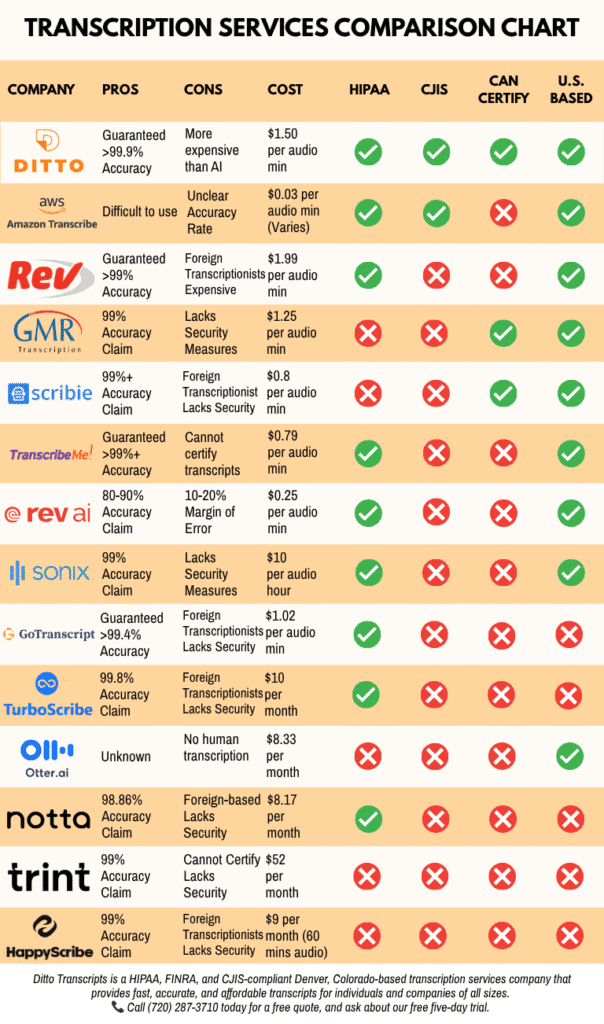
- Human transcriptionists: We only use trained professionals who understand context, accents, and terminology, turning audio and video into professional transcripts.
- Support for accessibility needs: Transcripts can include speaker labels, meaningful sound descriptions, readable formatting, and visual descriptions as per the client’s needs.
- Industry-specific experience: Ditto not only provides a wide range of transcription services. It also specializes in legal, medical, law enforcement, academic, business, financial, insurance, media, government, and personal transcription projects.
- Secure handling: Confidentiality is non-negotiable. These sensitive recordings are handled through workflows designed to protect client files and transcripts.
- Compliance support: Ditto provides HIPAA, CJIS, and FINRA-compliant transcription support to clients.
- Flexible legal transcription pricing and turnaround options: Clients can choose from multiple pricing and turnaround options based on file specifics such as length, urgency, audio quality, number of speakers, and project requirements.
- No long-term contract required: The best part? There’s no strings attached. Clients can use Ditto for one or multiple projects without any long-term commitments.
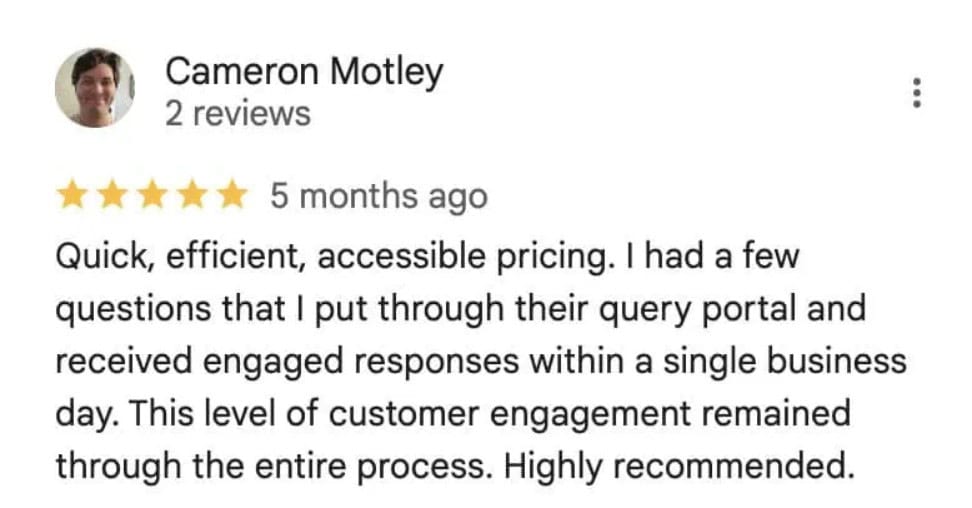
Whether you need transcription you can trust, from sensitive legal recordings to medical, business, academic, and accessibility-focused projects, professionals rely on Ditto for accuracy, confidentiality, and dependable service. Their feedback reflects the care we put into every transcript and the standards we work to meet on every project. For a better sense of the client experience, here’s one client testimonial:
One Step at a Time
For WCAG-compliant transcription, the best approach is to start with the basics. Start with Level A compliance where required, then improve from there.
Accessibility is not only a checklist or a technical requirement. It is an invitation. It tells more people that they are welcome to use your content, learn from it, share it, and participate.
A transcript can make one recording more accessible. A consistent transcription process can make your entire organization easier to understand.
Ditto Transcripts is a Denver, Colorado-based FINRA, HIPAA, and CJIS-compliant transcription services company that provides fast, accurate, and affordable transcripts for individuals and companies of all sizes. Call (720) 287-3710 today for a free quote.