


Vimeo makes it easy to host and share professional video content. Still, viewers cannot always watch a full video or listen with the sound turned on. Some may also need captions or a written version to understand the content. A video transcription company can help when the exact wording matters. Sure, Vimeo can create a draft; however, the important videos still need a trained human to review the text.
In this article, you will learn:
- Why Vimeo videos should be transcribed
- How Vimeo’s automatic captions work
- How to upload your own transcript or caption file
- When human transcription is a better option
- What to look for in a professional transcription company
Why Transcribe a Vimeo Video?
A video transcript gives viewers another way to use your content.
Instead of replaying the video to locate one statement, they can search the written document for a name, topic, date, or keyword. The transcript can also be copied into a blog post, training guide, article, social media post, or internal document.
Accessibility
Captions and transcripts help people who are Deaf or hard of hearing access spoken information. They can also support people who have difficulty processing audio or simply prefer to read.
The World Wide Web Consortium recommends providing both captions and a transcript when possible. Captions appear with the video, while a separate transcript allows the reader to review the content at their own pace. A descriptive transcript can also include important visual details for people who cannot see the video.
Easier Content Review
Transcripts are useful for long videos, such as webinars, lectures, interviews, product demonstrations, and company presentations.
Just like with a legal transcript, a reader can scan the document much faster than they can watch an hour-long video. Timestamps can also help them return to the correct part of the recording.
For universities, instructors, and research teams, academic transcription services can turn Vimeo lectures, interviews, and panel discussions into text that is easier to study and quote.
More Content From One Video
One Vimeo recording can be repurposed into several formats:
- A blog article
- Short social media posts
- Email content
- Training material
- A downloadable guide
- Video captions
- Translated subtitles
Vimeo itself recommends downloading and repurposing transcripts for blog content and localized subtitles. W3C also notes that headings, links, and other organizational elements added to a transcript can make it more useful and support search visibility.
A Searchable Written Record
Some videos contain information that may be needed later, including government meetings, employee training, public presentations, or recorded interviews.
Government transcription services can help agencies preserve this material in a clear format while meeting the project’s security and formatting requirements.
A transcript does not replace the source video. It gives people a faster way to find and review what was said.
Three Ways to Transcribe Vimeo Videos
There are three practical options: use Vimeo’s automatic captions, upload a caption file, or hire a professional transcription company.
| Method | Best for | Main limitation |
| Vimeo automatic captions | Quick drafts and casual content | Errors still require manual review |
| Uploading your own file | Videos with an existing SRT or WebVTT file | The file must already be created and formatted |
| Professional transcription | Important, technical, or difficult recordings | Costs more than unchecked AI |
Option 1: Use Vimeo’s Automatic Captions
Vimeo provides automatic closed captions on qualifying paid accounts.
For uploaded videos, automatic captions are generally available for videos added after May 25, 2022. Videos must also be eight hours or shorter. Vimeo labels these tracks as autogenerated so viewers can distinguish them from manually uploaded captions.
To find the transcript:
- Open the video from your Vimeo Library.
- Select Languages from the menu beside the video.
- Find the autogenerated caption track.
- Open the menu beside the track.
- Select Edit, View, or Download, depending on the available option.
Viewing, editing, and downloading a transcript require a paid plan and edit access to the video. Vimeo allows users to correct the wording and change individual subtitle timestamps from the transcript editor.
Automatic captions may fail when:
- The first 30 seconds contain no speech
- Music is louder than the speaker
- The recording has poor audio
- The stereo audio is out of phase
Older videos may also need to be uploaded again before Vimeo generates automatic captions.
Option 2: Upload a Caption or Subtitle File
You do not have to use Vimeo’s automatic transcript.
Vimeo allows users to upload their own caption or subtitle files. The platform currently supports SRT and WebVTT files and recommends WebVTT. The file should use UTF-8 encoding so special characters display correctly.
To upload a file:
- Open the video from your Library.
- Select Languages.
- Select the + button.
- Choose the caption or subtitle file from your device.
- Select the language.
- Choose whether the file contains captions or subtitles.
- Upload the file and turn on the track.
Captions and subtitles are not the same.
Captions include spoken words and important sounds needed to understand the video. Subtitles usually display dialogue, often in another language.
Once the file is active, viewers can select it using the CC button in the Vimeo player.
Option 3: Use Professional Human Transcription
Vimeo’s automatic tool can save time; however, someone still needs to check the output.
That work may be manageable for a five-minute casual video. It becomes more difficult with a long webinar, several speakers, poor audio, technical terms, or strong accents.
A professional transcription company listens to the entire recording, identifies the speakers, checks unclear sections, researches unfamiliar terms, and formats the final document according to the client’s instructions.
This option is useful for:
- Business presentations
- Research interviews
- Training videos
- Financial discussions
- Medical webinars
- Recorded public meetings
- Legal or investigative content
- Videos with several speakers
Human transcription also gives the client more control over the final format. The transcript can include speaker labels, timestamps, headings, or notes for unclear audio.
Is Vimeo’s Automatic Transcription Accurate?
Vimeo does not promise that every automatic transcript will be error-free.
Automatic speech recognition predicts which words were spoken based on the available audio. The result depends heavily on recording quality, speaker clarity, background noise, accents, and subject matter.
Depending on the system and testing conditions, an AI transcript may be only 61.92% accurate.
Common errors include:
- Incorrect names
- Missing words
- Wrong speaker labels
- Confused numbers
- Misheard technical terms
- Poor punctuation
- Missing context
- Incorrect timestamps
Even Vimeo recommends editing automatic transcripts before publishing them. W3C also states that automatic captions need to be reviewed and corrected for accuracy.
These problems matter more when the video contains medical terms, financial figures, legal details, or research findings.
A viewer may understand the general meaning of an imperfect caption. However, a transcript meant for publication, documentation, or formal review should not depend on guesswork.
When Should You Use Verbatim Transcription?
Not every Vimeo transcript needs to include every repeated word, false start, or filler sound.
A cleaned-up transcript is often better for presentations, marketing videos, training content, and educational material. It removes unnecessary fillers while keeping the speaker’s meaning.
Verbatim transcripts are more suitable when the exact manner of speech matters. This may include interviews, investigations, hearings, witness statements, or research that studies how people communicate.
Before ordering a transcript, decide whether you need:
- Clean verbatim: Removes fillers, stutters, and unnecessary repetition
- Full verbatim: Preserves every spoken word and relevant sound
- Edited transcription: Reworks the speech into polished written content
- Caption formatting: Breaks the transcript into timed lines for video display
Choosing the right format can reduce editing later.
What to Look for in a Transcription Provider
A low rate should not be the only reason to choose a provider.
Before uploading a Vimeo video, ask:
- Will a trained human review the full recording?
- Can the company handle your subject matter?
- Are speaker labels and timestamps available?
- How are files uploaded, stored, and deleted?
- Can the transcript be delivered in the format you need?
- Is the price explained before work begins?
- What happens if a correction is required?
For sensitive videos, also check whether the company uses U.S.-based transcriptionists and follows appropriate security standards.
Why Clients Choose Ditto for Vimeo Video Transcription
At Ditto Transcripts, Vimeo recordings are handled by trained professionals rather than being returned as unchecked automatic output.
Here is what Ditto offers:
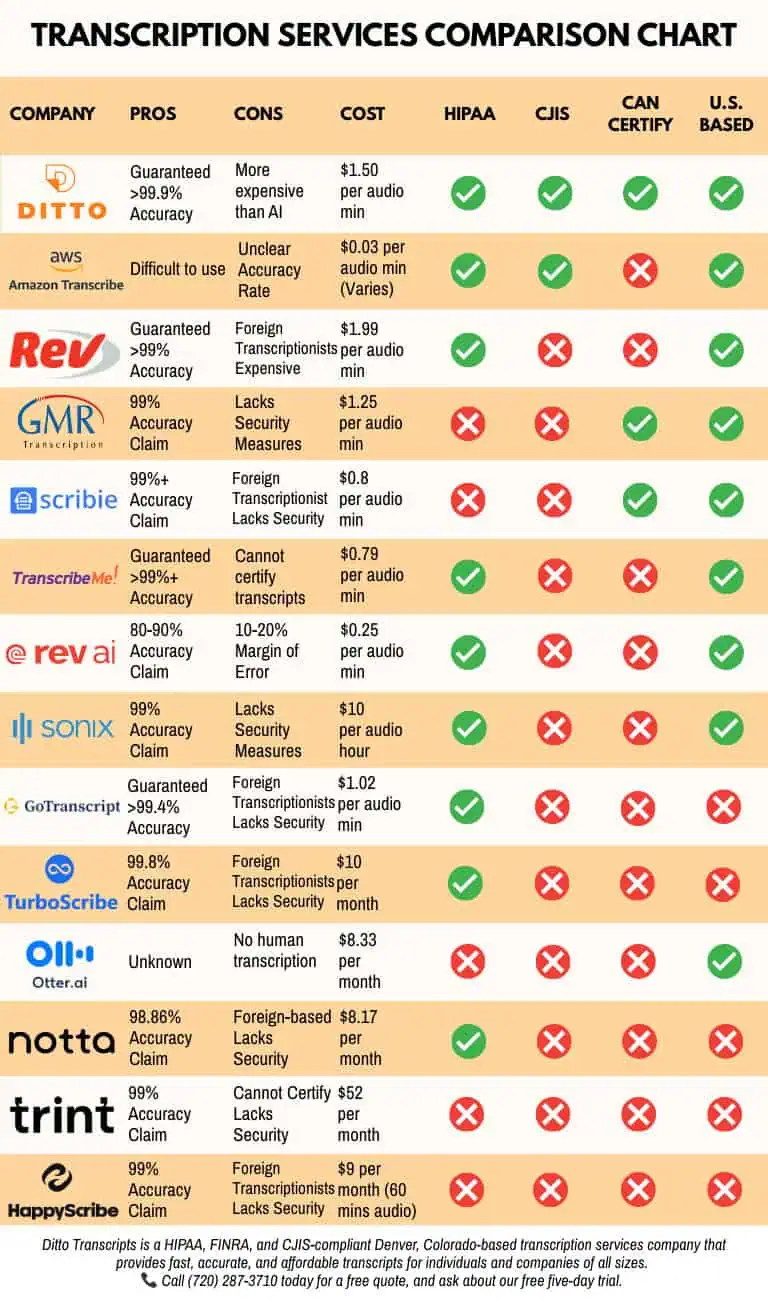
- Human-reviewed accuracy: Ditto guarantees 99% accuracy for completed human transcription projects.
- U.S.-based transcriptionists: Projects are completed by professionals familiar with American English, accents, technical language, and multi-speaker recordings.
- Video transcription experience: Ditto works with interviews, webinars, presentations, training recordings, online videos, and other audio and video material.
- Custom formatting: Clients can request timestamps, speaker labels, clean verbatim, full verbatim, or another preferred format.
- Secure handling: Ditto provides HIPAA- and CJIS-compliant workflows for projects involving confidential or sensitive information.
- Flexible turnaround: Rush, standard, and extended options are available based on the length and difficulty of the recording.
- Clear legal transcription pricing: General video transcription starts at $1.50 per audio minute for extended turnaround. Rates may increase for several speakers, difficult audio, or faster delivery.
- Related project costs: Clients with legal recordings can also review Ditto’s legal transcription prices before submitting a project.
- No long-term contract: Clients can submit one Vimeo recording or use Ditto for continuing projects.
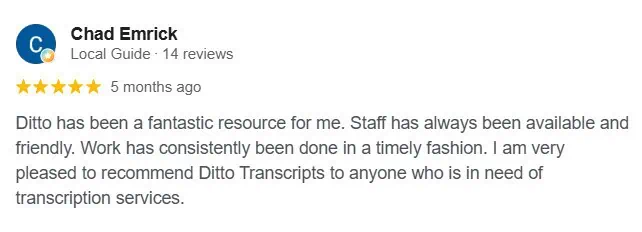
- Client feedback: Read Ditto’s testimonials to see how clients describe the company’s accuracy, service, communication, and turnaround times.
Turn Vimeo Videos Into Useful Written Content
Vimeo’s automatic captions provide a convenient starting point. They can work well for casual videos or as a first draft that will be checked later.
For important recordings, the text should be reviewed before it is published, shared, or used as formal documentation.
An accurate transcript makes Vimeo content easier to search, study, repurpose, and access. It also saves viewers from replaying the full video whenever they need one detail.
Ditto Transcripts helps businesses, universities, agencies, researchers, and content creators turn Vimeo videos into accurate and readable text.
Ditto Transcripts is a Denver, Colorado-based transcription services company providing fast, accurate, and affordable transcripts for individuals and organizations of all sizes. Ditto is HIPAA-, CJIS-, and FINRA-compliant. Call (720) 287-3710 today for a free quote.